
2026/10/26 因接連被Turnitin團隊通報帳號濫(盜)用,即日起不再開放本校學生自行以註冊密鑰加入圖書館比對課程。有比對需求學生請參考下方說明申請加入課程。
Due to repeated reports from Turnitin regarding account misuse or unauthorized access, students may no longer enroll in the Library's similarity-checking course using an Enrollment Key on their own. Students who need similarity checking services should follow the instructions below to apply for course enrollment.
2025/03/03 帳號安全機制更新:1.教師帳號若逾6個月未登入將會鎖定,須由管理者解除鎖定(請與圖書館聯絡)。2.使用者重設密碼信件中,重設密碼連結有效期限自 24小時更新為 1小時。
2023/09/19 教師身分上傳文稿方式更新:取消教師以「未註冊學生」為作者的文稿上傳方式;使用者以「教師身分」上傳文稿,將需要加入自己為學生身分,或採用快速提交的方式上傳。
使用手冊 |https://www.igroup.com.tw/turnitin-feedback-studio/user-guide-student/
User Guides|https://guides.turnitin.com/hc/en-us
教育訓練文件|影片連結(學生版2025.09更新)、影片連結(教師版)、師生版投影片(2026.10更新)、教師版投影片、教師版報告畫面更新
- 教師請來信 lib3@mail.ntpu.edu.tw 申請教師帳號 (可依據教學或研究需求自行開設比對課程)。
- 本校碩博士學位考試細則第四條相關規定:舉行論文學位考試之學生應完成「論文原創性比對」,供學位考試委員參考,論文比對標準由各系(所、學位學程)、院自訂。
- 本校電子郵件使用請參考資訊中心網頁、常見問題說明。
- 若使用 @webmail.ntpu.edu.tw (學生)、@mail.ntpu.edu.tw (教職員) 信箱未收到 Turnitin 寄發認證相關通知信,請登入學校垃圾郵件信箱查看確認,帳號密碼同電子郵件。
- 圖書館開設的比對課程「不會」儲存文稿,上傳的文稿內容不會成為比對源,若比對結果超過90%,表示先前曾將文稿上傳到非圖書館開設課程中,欲申請刪除文稿請與圖書館聯絡。
- 每個作業至多可重複上傳50次,重複上傳將會覆蓋前一次比對結果。第4次(含)以後 ,需等約 24 小時才會覆蓋前一份原創性報告產生比對結果。如有急需,請改利用其他作業上傳。
加入圖書館比對課程 / Enroll in the Class
➡️ Turnitin網站 / Turnitin Website
http://www.turnitin.com/ 不限校內外使用。Available for both on- and off-campus use.
➡️ 帳號使用注意事項 / Account Usage Reminders
➡️ 寄信申請加入課程 / Email the Library to Request Course Enrollment
➡️ 建立Turnitin帳號 / Create a New Student Profile
➡️ 已有Turnitin帳號 / Already Have a Turnitin Account
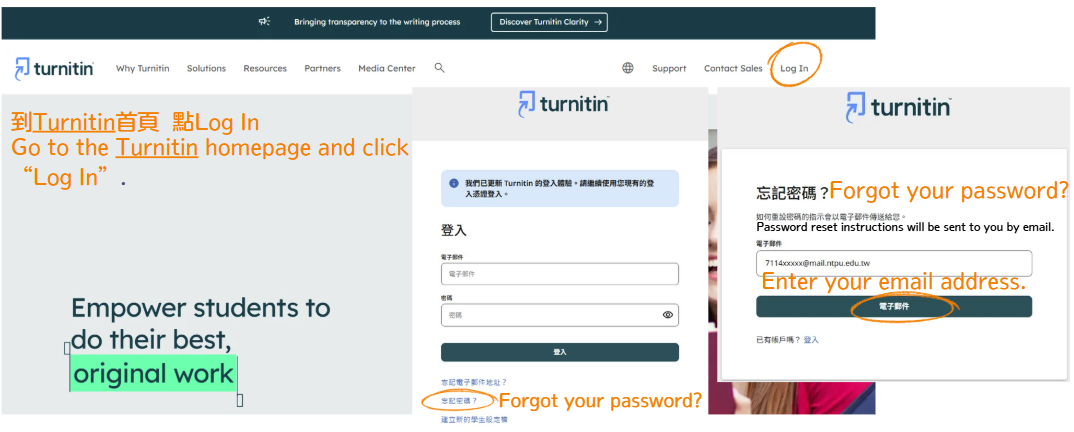
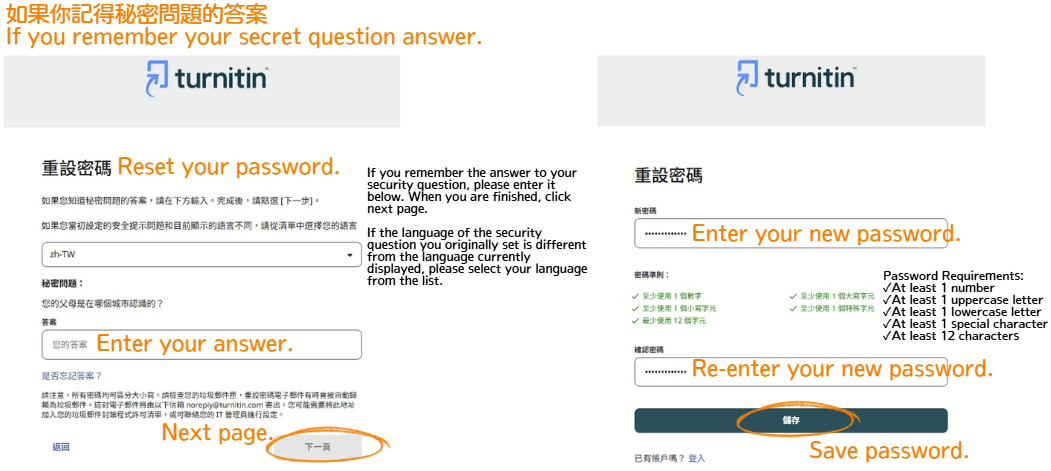
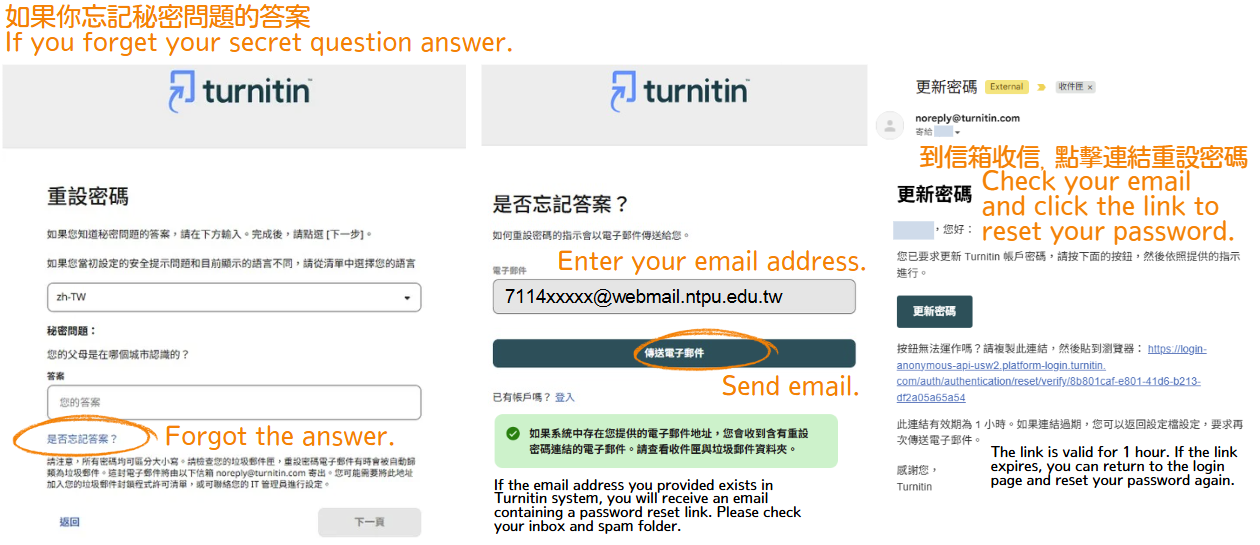
➡️ 重設密碼 / Reset your password
----------------------------------------------------------------------------------------------------------------------------
💠帳號使用注意事項 / Account Usage Reminders
為維護本校師生使用 Turnitin 權益,帳號限本人使用,若出現濫用課程作業情形,例如比對他校或他國文稿、上傳次數超出合理範圍,將封鎖帳號且列入黑名單,往後不得再申請加入課程。
Turnitin accounts are for individual use by NTPU faculty, staff, and students only.
Any misuse of course assignments, such as submitting manuscripts from other institutions or countries or uploading an unreasonable number of manuscripts, for similarity checking, will result in account suspension and placement on a blacklist. Users on the blacklist will not be permitted to apply for course enrollment in the future.
💠請寄信至圖書館公務信箱申請加入課程 / Please email the Library to request enrollment in the course
請以您的學校信箱(@webmail.ntpu.edu.tw、@gm.ntpu.edu.tw、@ms.ntpu.edu.tw)寄信至 lib3@mail.ntpu.edu.tw 申請,不受理使用個人信箱提出申請。
Please send your request to lib3@mail.ntpu.edu.tw using your university email account (@webmail.ntpu.edu.tw, @gm.ntpu.edu.tw, or @ms.ntpu.edu.tw).
Requests submitted from personal email accounts will not be accepted.
信件主旨:申請加入Turnitin課程
Email Subject: Request to Enroll in the Turnitin Course.
信件內文:請分別提供您的姓、名
Email Body: Please provide your last name and first name separately.
作業時間約需2~3個工作天,若有急需,寄出郵件後請於星期一到五上班時間(9:00~17:00)來電校內分機68343,或親自至圖書館1樓推廣服務組辦理。
Processing takes approximately 2–3 days. If you need urgent assistance, please call extension 68343 during office hours (9:00~17:00, Monday through Friday) after sending your email, or visit the Reference and Extension Services Section on the first floor of the Library in person.
本校電子郵件使用請參考資訊中心網頁、常見問題說明。
For instructions on using your NTPU email, please refer to the NTPU Computer Center website and the Frequently Asked Questions (FAQ).
若使用 @webmail.ntpu.edu.tw 信箱未收到 Turnitin 寄發相關通知信,請登入學校垃圾郵件信箱查看確認,帳號密碼同電子郵件。
If you do not receive Turnitin notification emails in your @webmail.ntpu.edu.tw inbox, please check your NTPU Spam Mailbox. Use the same username and password as your university email account to log in.
💠建立Turnitin帳號 / Create a New Student Profile
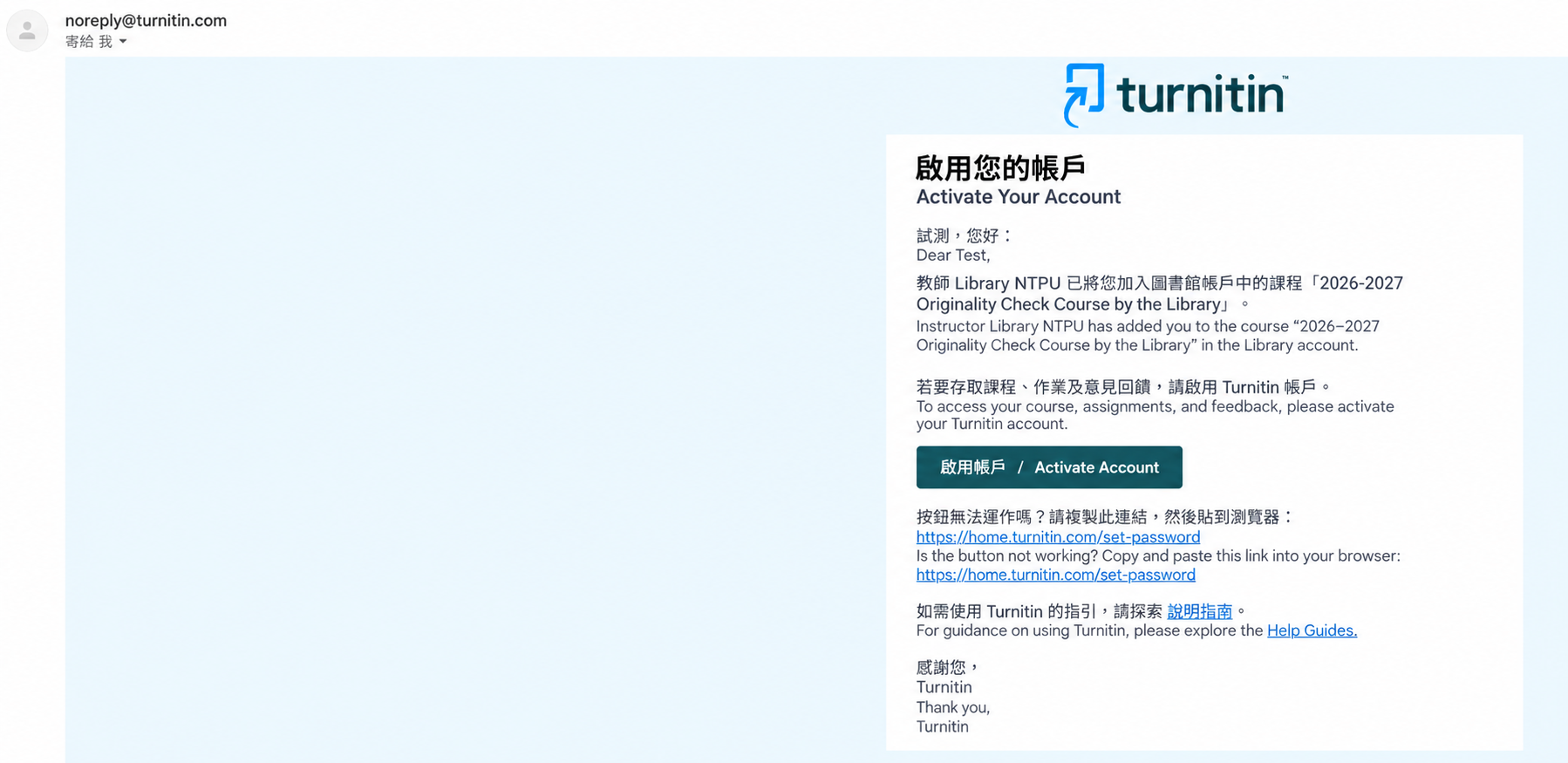
圖書館將您加入比對課程後,您將會收到由 noreply@turnitin.com 寄發的通知信,請點擊「啟用帳號」。
After the Library adds you to the similarity-checking course, you will receive an email notification from noreply@turnitin.com. Please click “Activate Account” in the email.

請在下一個頁面輸入您的電子郵件。
Please enter your email address on the next page.
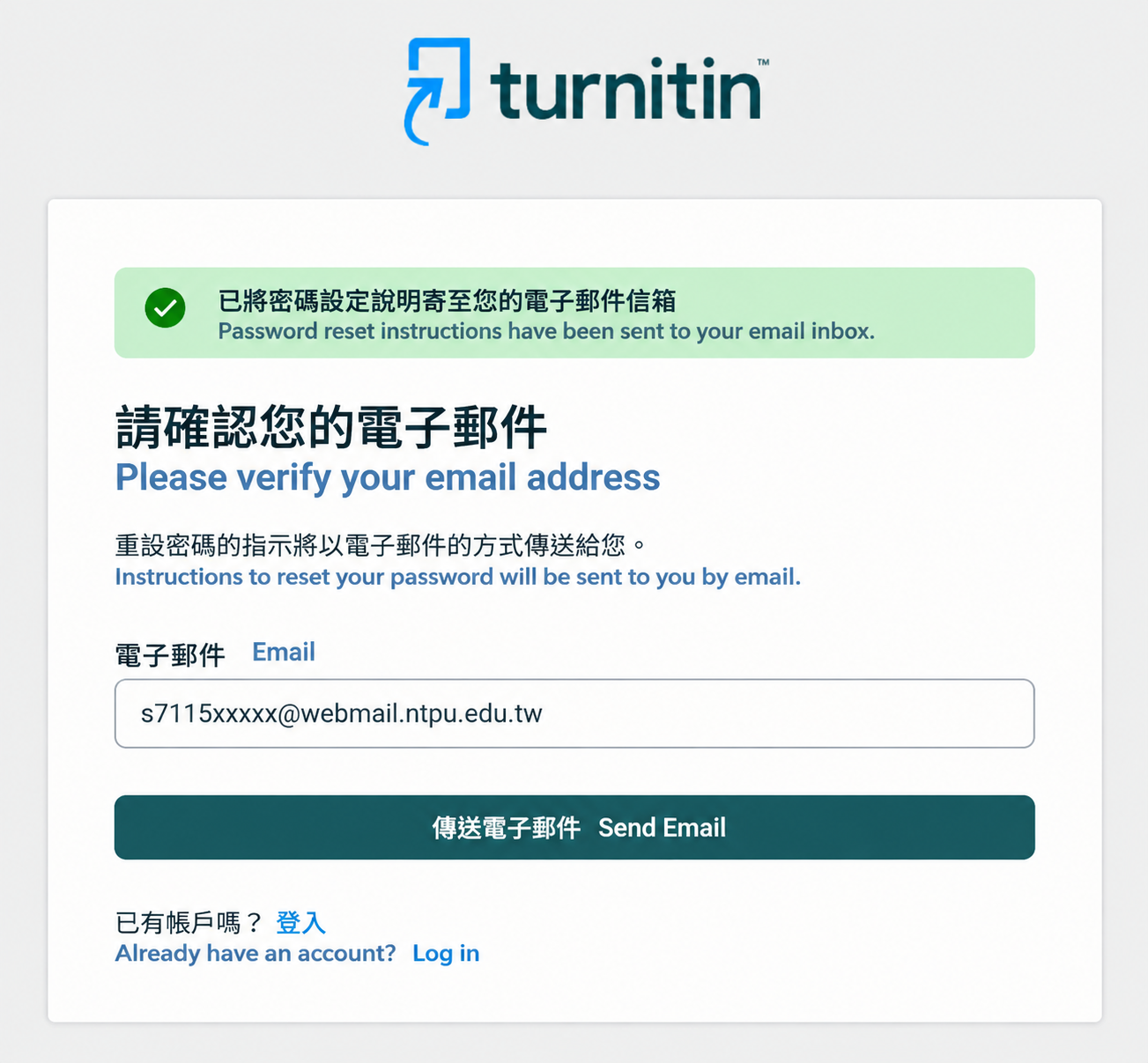
之後您將會收到重設密碼的郵件,請點擊信中「設定密碼」。
You will then receive an email with instructions to reset your password. Please click “Set Password” in the email.

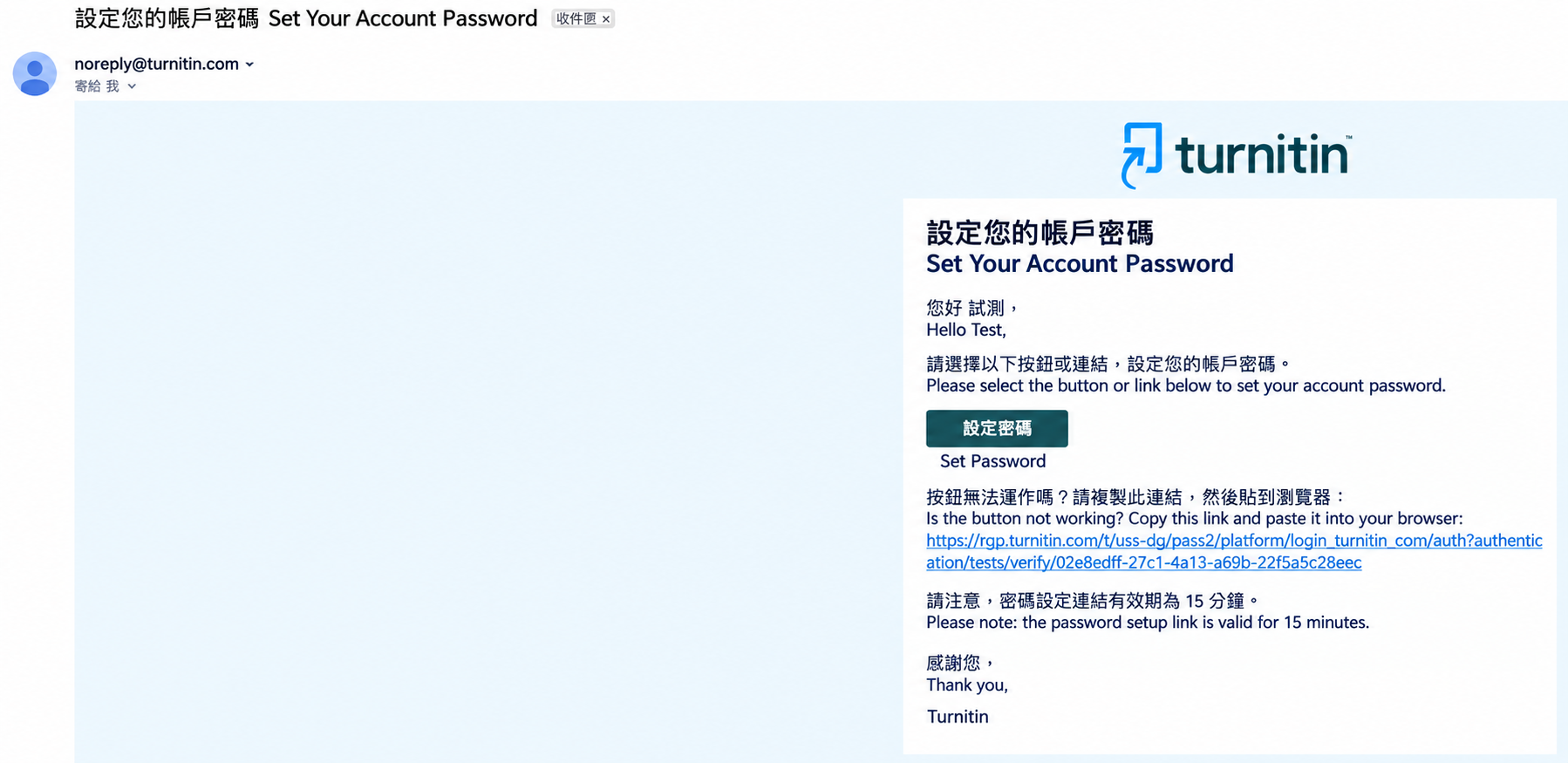
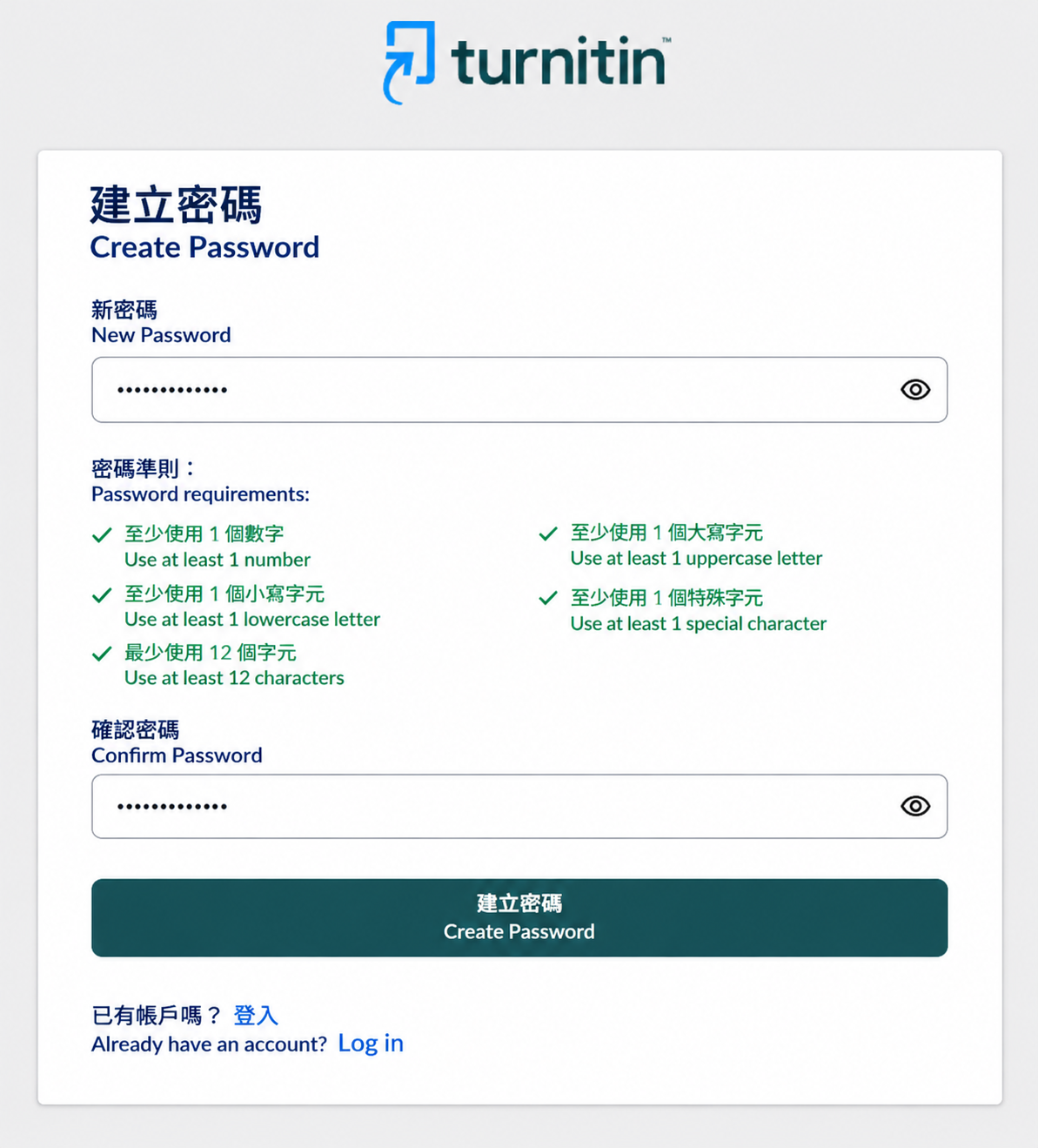
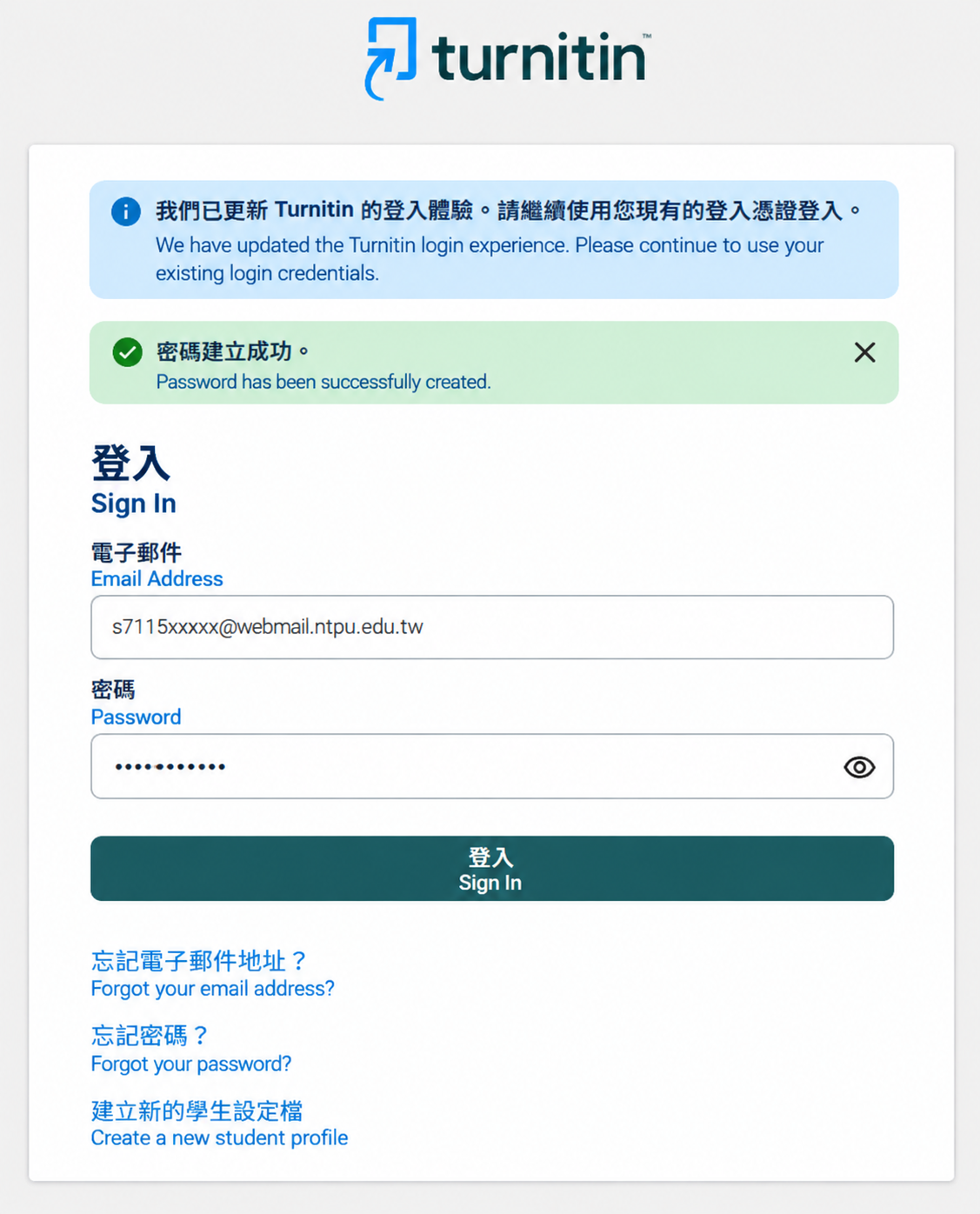
接著使用您所設定的密碼登入。
Next, log in using the password you have set.
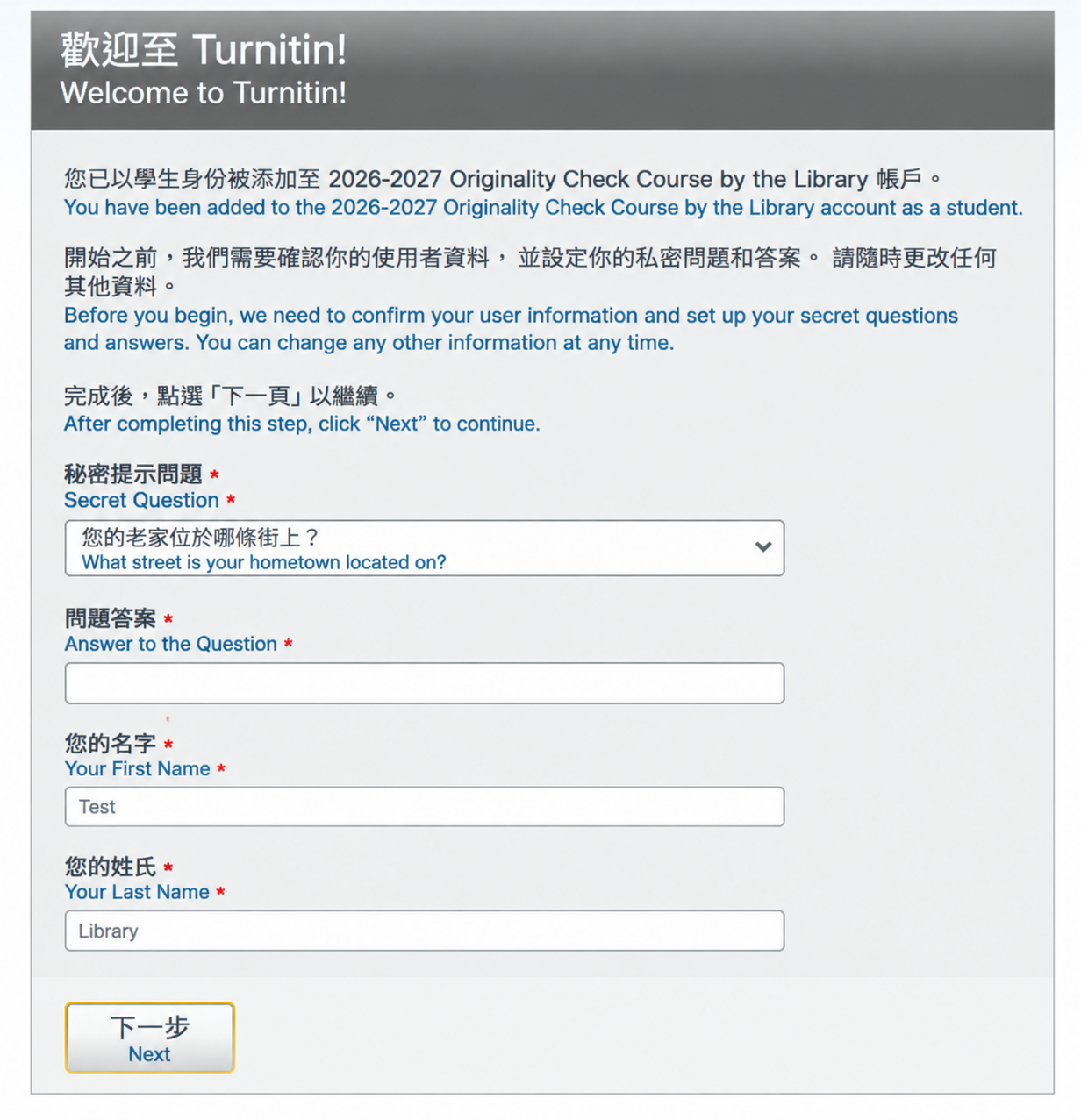
請設定您的秘密問題和答案。
Please set up your own security question and answer.
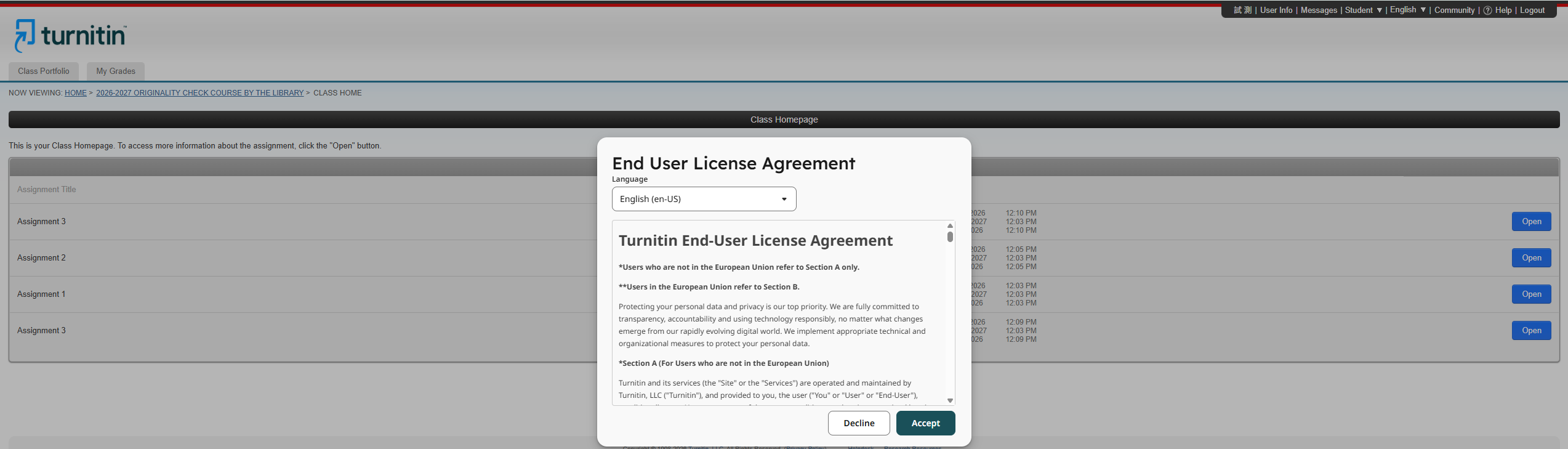
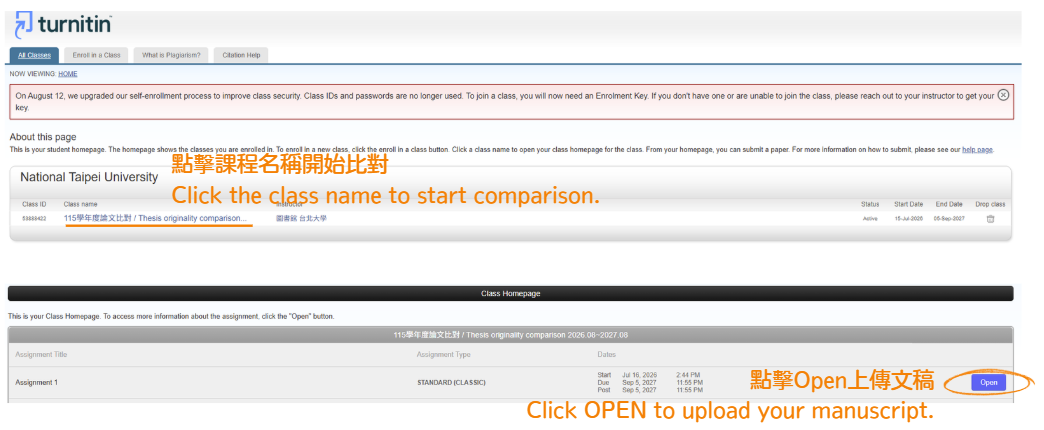
出現課程頁面,點擊課程名稱後將出現使用者授權協議,請點擊「接受」,之後就可以開啟作業上傳文稿。
The course page will appear. Click the course name to view the End User License Agreement, then click “Accept” to proceed. You can then access the assignment to upload your manuscript.

💠已有Turnitin帳號 / Already Have a Turnitin Account
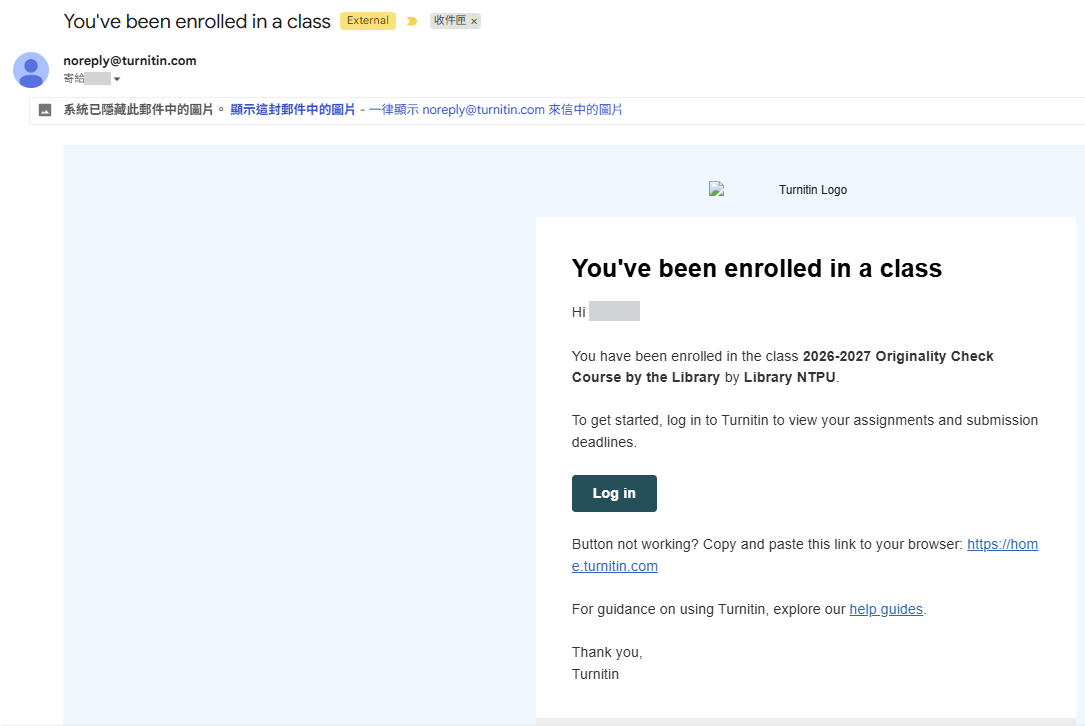
若您已有符合本校規範且已啟用的Turnitin帳號,圖書館將您加入比對課程後,您將會收到由noreply@turnitin.com寄發的已加入課程通知信。直接登入Turnitin 即可看到課程。
If you already have an active Turnitin account that complies with the University's requirements, you will receive an enrollment notification email from noreply@turnitin.com once the Library has added you to the similarity-checking course. Simply log in to Turnitin to access the course.

圖書館Turnitin業務
推廣服務組 施小姐 (02)86741111#68343 spei@gm.ntpu.edu.tw
Turnitin客服資訊(智泉國際)
鄭小姐 (02)2571-3369#225 jenny.cheng@igrouptaiwan.com
戴小姐 (02)2571-3369#207 weichi.dai@igrouptaiwan.com